> ## Documentation Index
> Fetch the complete documentation index at: https://docs.centryos.xyz/llms.txt
> Use this file to discover all available pages before exploring further.
# Introduction
> Welcome to the CentryOS API documentation
# CentryOS API
Welcome to the CentryOS API documentation. Our API provides a RESTful interface for managing financial transactions and accounts through our Liquidity Service.
## Pre-requisites
Before using any endpoints, you'll need to:
1. **Create a CentryOS account** for your organization
2. **Obtain your apiClientId and apiClientSecret from your dashboard**
3. **Generate a JWT token**
## Account Setup
### 1. Sign Up for a CentryOS Account
Click **[Sign Up](https://sandbox.app.centryos.xyz/account-setup)** to begin creating your account.
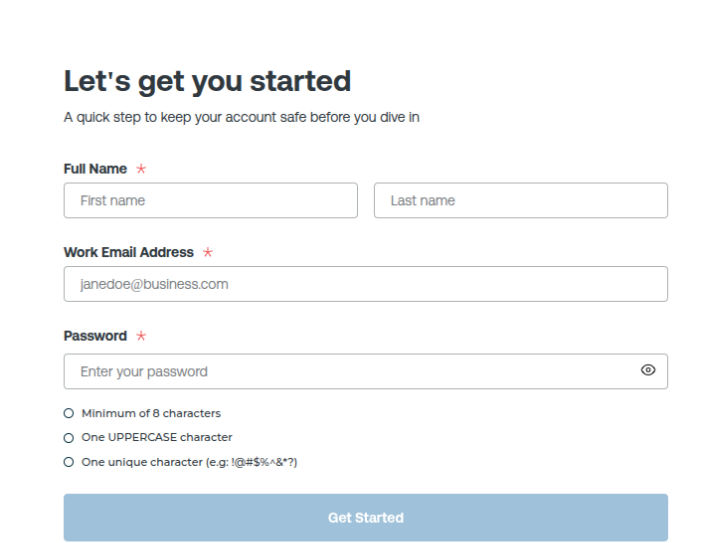 After clicking the link:
1. Fill in your required details.
2. You will be redirected to the verification page.
### 2. Enter Your Passcode
You will receive a **passcode** in your registered email.
Enter the passcode on the verification screen.
After clicking the link:
1. Fill in your required details.
2. You will be redirected to the verification page.
### 2. Enter Your Passcode
You will receive a **passcode** in your registered email.
Enter the passcode on the verification screen.
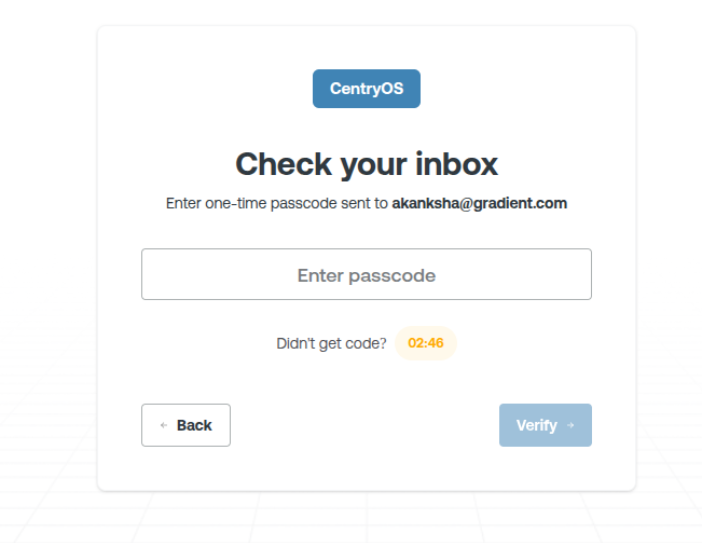 After successful verification, you should see a message:
> **“Account created successfully”**
### 3. Generate Your API Key and Register a Webhook URL
To generate your API key:
1. Go to the bottom-left corner of your dashboard.
2. Click on **Developer**.
After successful verification, you should see a message:
> **“Account created successfully”**
### 3. Generate Your API Key and Register a Webhook URL
To generate your API key:
1. Go to the bottom-left corner of your dashboard.
2. Click on **Developer**.
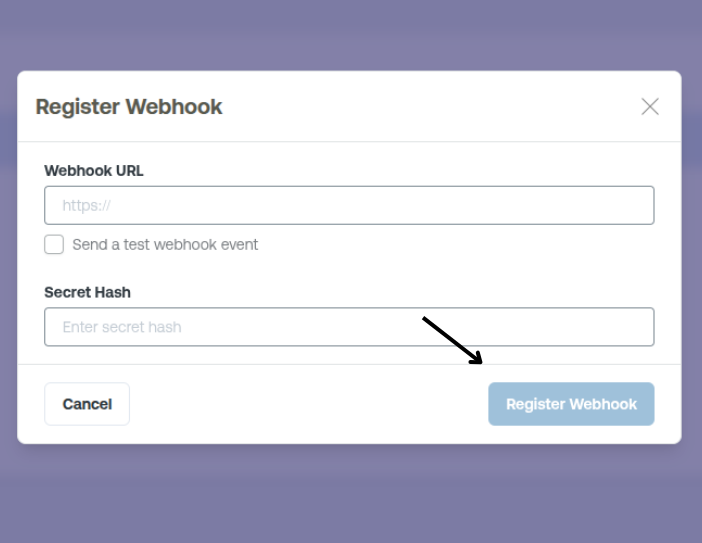
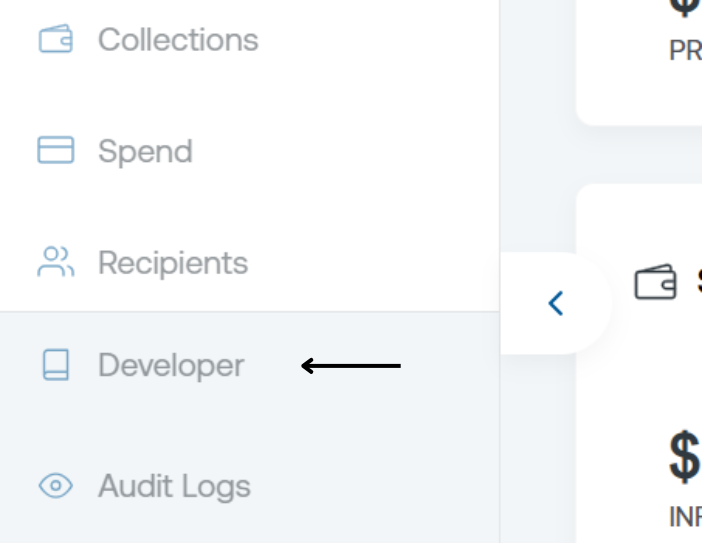 Inside the Developer section:
1. Click **Add Webhook URL**
2. Provide the URL and the **Secret Hash**
3. Click **Register**
Inside the Developer section:
1. Click **Add Webhook URL**
2. Provide the URL and the **Secret Hash**
3. Click **Register**
 Keep your API keys secure and never expose them in public repos or client-side code.
## Base URLs
| Environment | Base URL (ACCOUNT) |
| ----------- | ------------------------------------------ |
| Production | `https://user-accounts-api.centryos.xyz` |
| Staging | `https://account-staging-api.centryos.xyz` |
| Environment | Base URL (LIQUIDITY) |
| ----------- | -------------------------------------------- |
| Production | `https://ledger-api.centryos.xyz` |
| Staging | `https://liquidity-staging-api.centryos.xyz` |
## Response Format
All responses are returned in JSON format and follow a consistent structure:
```json theme={null}
{
"data": {
// Response data
},
"message": "",
// Response message
"meta": {
// Metadata about the response (for paginated endpoints)
}
}
```
## Rate Limiting
The API has rate limits to ensure fair usage:
1000 requests per minute
100 requests per minute
## Error Handling
The API uses conventional HTTP response codes to indicate the success or failure of requests:
| Code | Description |
| ---- | ----------------------------------------- |
| 200 | Success |
| 400 | Bad Request - Invalid parameters |
| 401 | Unauthorized - Invalid or missing API key |
| 403 | Forbidden - Insufficient permissions |
| 404 | Not Found - Resource doesn't exist |
| 429 | Too Many Requests - Rate limit exceeded |
| 500 | Internal Server Error |
Error responses follow this format:
```json theme={null}
{
"message": "Detailed error message"
}
```
## Support
If you need help or have questions:
1. Check the API documentation
2. Contact support at [centryos@gradientfi.com](mailto:centryos@gradientfi.com)
Keep your API keys secure and never expose them in public repos or client-side code.
## Base URLs
| Environment | Base URL (ACCOUNT) |
| ----------- | ------------------------------------------ |
| Production | `https://user-accounts-api.centryos.xyz` |
| Staging | `https://account-staging-api.centryos.xyz` |
| Environment | Base URL (LIQUIDITY) |
| ----------- | -------------------------------------------- |
| Production | `https://ledger-api.centryos.xyz` |
| Staging | `https://liquidity-staging-api.centryos.xyz` |
## Response Format
All responses are returned in JSON format and follow a consistent structure:
```json theme={null}
{
"data": {
// Response data
},
"message": "",
// Response message
"meta": {
// Metadata about the response (for paginated endpoints)
}
}
```
## Rate Limiting
The API has rate limits to ensure fair usage:
1000 requests per minute
100 requests per minute
## Error Handling
The API uses conventional HTTP response codes to indicate the success or failure of requests:
| Code | Description |
| ---- | ----------------------------------------- |
| 200 | Success |
| 400 | Bad Request - Invalid parameters |
| 401 | Unauthorized - Invalid or missing API key |
| 403 | Forbidden - Insufficient permissions |
| 404 | Not Found - Resource doesn't exist |
| 429 | Too Many Requests - Rate limit exceeded |
| 500 | Internal Server Error |
Error responses follow this format:
```json theme={null}
{
"message": "Detailed error message"
}
```
## Support
If you need help or have questions:
1. Check the API documentation
2. Contact support at [centryos@gradientfi.com](mailto:centryos@gradientfi.com)